Showing posts with label Samsung mobile. Show all posts

Thursday, October 20, 2011

Samsung S5230 charging indication doesn't show

Fault description:
Samsung S5230 mobile some time shows not charging indication on screen every time. Due to this we can’t charge mobile and battery just drains after few hours. This problem mainly occurs due to shorting in charging filter.

Fault solution:
For quick solution of this problem we have to use following solution:-
1.       In some cases due to batteries internally circuitry problem creates this situation that mobile shows auto charging so first we should change battery and check result.
2.       After this try to change charging connector
3.       After replacing new charging connector  check track line continuity from charging pin 1,2 to desired point as shown in image below and from 19,20 to ground 
4.       If on any point line missing then apply jumper from pin’s point to pcb point as shown image below:

Conclusion:

Samsung s5230 mobile have 20 point charging connector so during jumpering process we should short point 1and 2, 19 and 20 for proper result.

Friday, August 5, 2011

Samsung C3303 always shows automatic charging indicatio

Fault description:
Samsung C3303 mobile some time shows automatic charging indication on screen every time. Due to this we can’t charge mobile and battery just drains after few hours. This problem mainly occurs due to shorting in charging filter.

Fault solution:
For quick solution of this problem we have to use following solution:-
1.       In some cases due to batteries internally circuitry problem creates this situation that mobile shows auto charging so first we should change battery and check result.
2.       During charging process current flows from charging pin to charging connector and from connector it went to charging filter and finally from  these charging filter current goes to charging IC and mobile get properly charging but in some cases because of improper frequency of voltage and current these charging filter got internally shorting and due to shorting mobile shows auto charging so for solve this problem we have to remove all three charging filter one by one . 
3.       So first remove one charging filter from heat gun carefully. These filters are shown in image below in red mark and after it if problem not solve then remove all remaining both filter.


After all three step procedure mobile will shows normal charging process when we need.

Conclusion:
During charging filter removing process take special care because extra or deep heat can damage internally mobile tracks so be careful.

Tuesday, August 2, 2011

Samsung champ 3303 network can't make or receive calls solution

Fault description:

Samsung cham 3303k have network fault. In such condition we get no service message on screen or just few network indication bars on screen. So we can’t make any call or receive any call.

Fault solution:

For repairing network problem we have to proceed with these tricks step by step: 
1.       First manually search network in setting option if we found there desired network provider then register that provider else apply next step.
2.      Try to hard reset mobile using these code  “  *27678*2878# ”  then mobile will display this ,message on the screen “E2P custom reset mobile will take few minutes do not power off mobile” . Now check the network if still no luck then use hardware tricks described below
3.      Open mobile pcb and first clean full pcb with acetone and dry mobile completely 
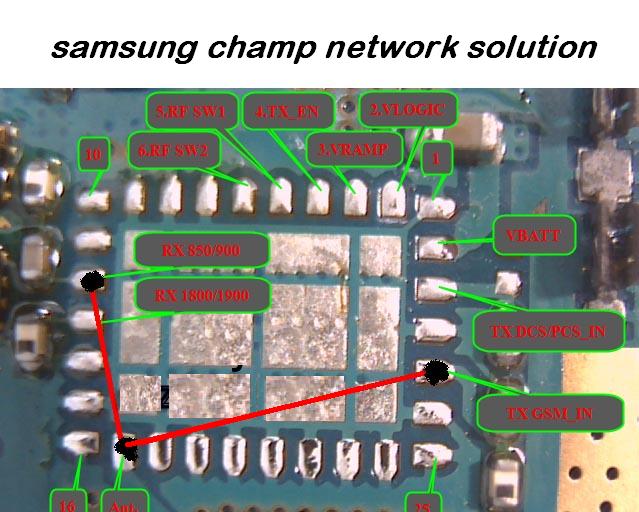
4.      If no solution yet then first remove PFO (power frequency oscillator) and apply following jumper and connect three points together according to network frequency we need. Here we use frequency of 850/900 MHz.
Image for the jumper setting is:


Conclusion:
During mobile pcb (printed circuit board) cleaning we should use only acetone or white petrol because other hard chemical can damage other mobile print and tracks. 

Thursday, July 21, 2011

Samsung E1110 doesn't start blinking solution

Fault description:

Samsung mobile sometime doesn’t start when we power on mobile it just hangs on Samsung logo only. This fault occurs because of internet problem or corrupted software.

Fault solution:

For this problem solution we have to use flasher box z3x or hwk. Here we use z3x box. Use these steps for successful flashing:

1.Connect z3x box to computer


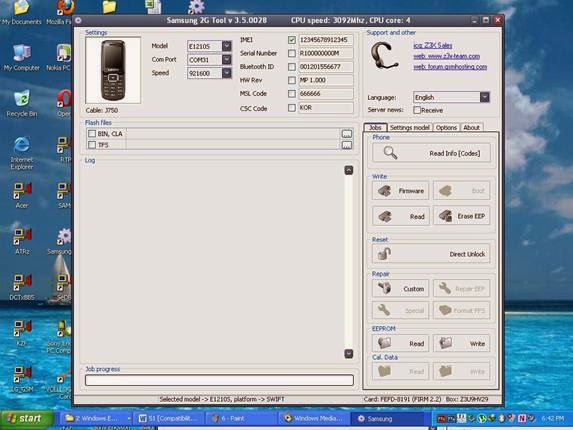
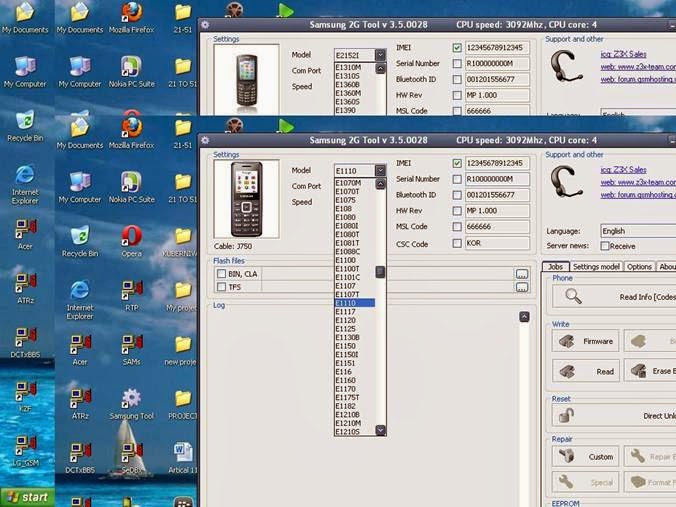
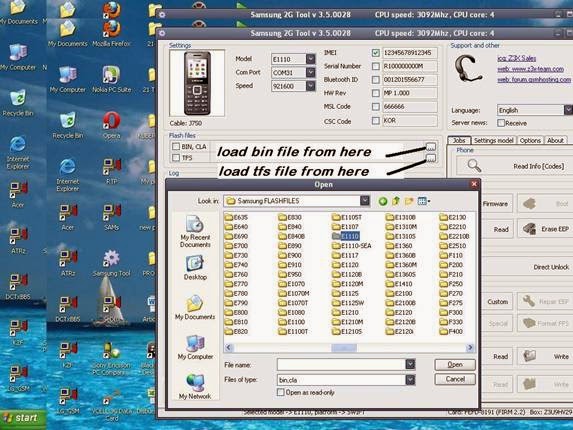
2.Attach mobile via flashing cable as shown in cable name icon and select mobile model from list


 Here in below image we can find exact cable for mobile as shown below


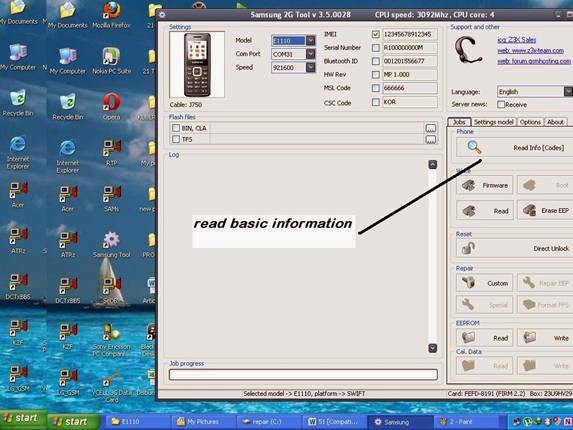
3.      Press read info button it will show all basic version we should remind that software version should be used newer then mobile already have. 


4. Now select  bin file and tfs file from my computer as shown in image below :


Wednesday, June 29, 2011

Samsung B3410 hang when sim card inserted

Fault description:
Samsung B3410 mobile sometime get strange problem that mobile hangs when we insert sim in mobile. But when we use mobile without sim card it works fine without any problem.

Fault solution:

For solving this problem we have to use software methods. Apply these easy steps to repair this problem.

1.       First reset mobile using code “*2767*2878#” after this mobile will shows e2p custom reset message on screen so wait 2 minutes then mobile will reset to its default factory mode now check problem.
2.        If no solution then connect Z3x box and attach mobile via flashing cable to box
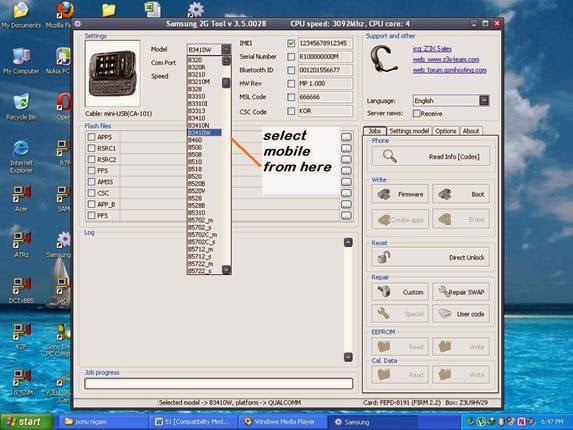
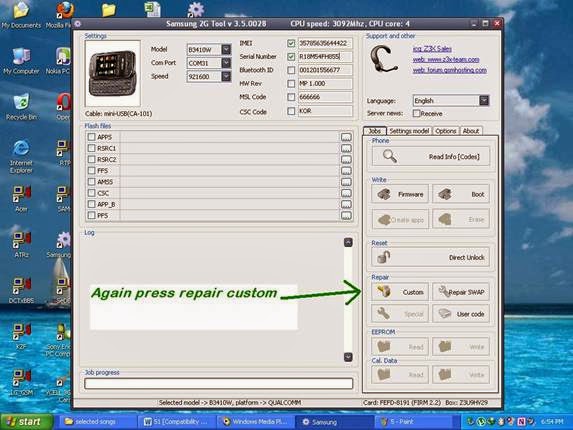
3.       Select model from model list here we select B3410 as shown in image:


4.       Now press read info button It will shows all basic information like software version ,imei no. , lock version etc.


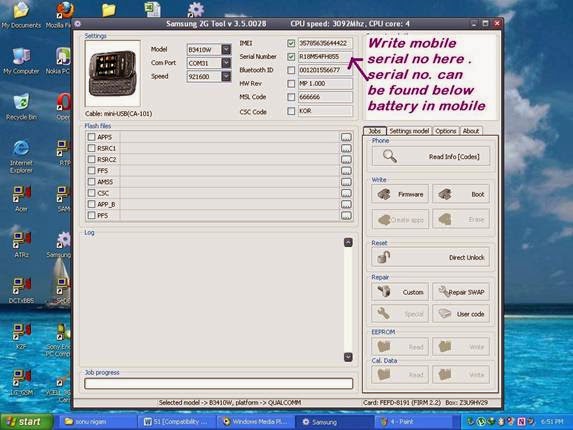
5.       Then if mobile will shows imei 0000000000000 (in 90% cases of hang with sim card) now write mobile’s original imei in imei tab as shown in image:


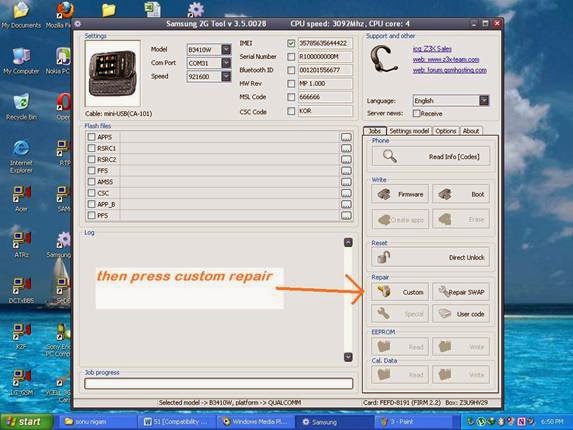
6.       After writing imei press repair custom icon it will write imei to mobile


7.       Now check problem if problem still not solved then we have to repair serial no also so use step 8
8.       Write mobile’s original serial no. in serial no. tab we can find serial no on back side rapper on mobile below battery. We should write proper serial no. because if we use wrong no. then mobile will permanently damage.


9.       After writing serial no. again press repair custom button then box will write serial no. to mobile.


10.   After all done check mobile info there we will find original imei no. and problem will solved.

Conclusion:
IMEI changing is illegal in some countries so write only original IMEI no. of same mobile written on mobile back side rapper or written on original bill.


Thursday, June 16, 2011

Samsung E1130 country lock with country provider problem

Fault description:
Some Samsung mobile have country lock with country provider so we can’t use any other provider sim into that this is called country lock. To use mobile in other country we have to unlock it first this is called unlocking process

Fault solution:
For unlock we have to use hwk or z3x or nspro box. Here we use hwk as example. Follow all these steps carefully:
1. First connect box to computer with mobile phone
2. Select mobile platform 
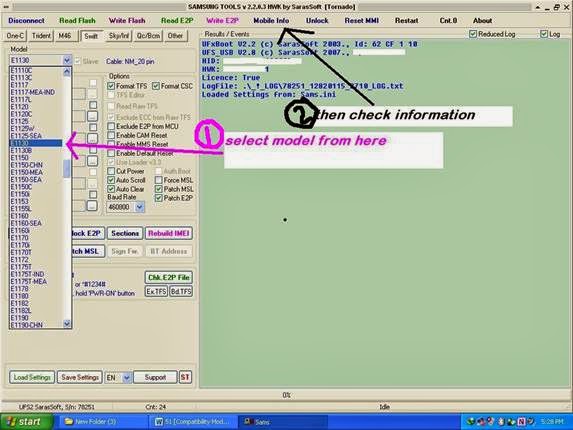
3. Select desired model and then press info here we select Samsung E1130


4. Then mobile will show all basic info about all lock provider and software version

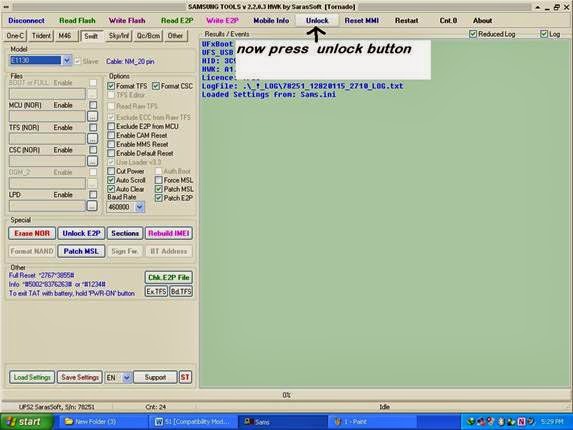
5. Now press unlock button then box will start unlock process


6. After this check info again and check weather lock version is showing 0000000 if yes then it mean we have unlocked mobile otherwise go to step 7

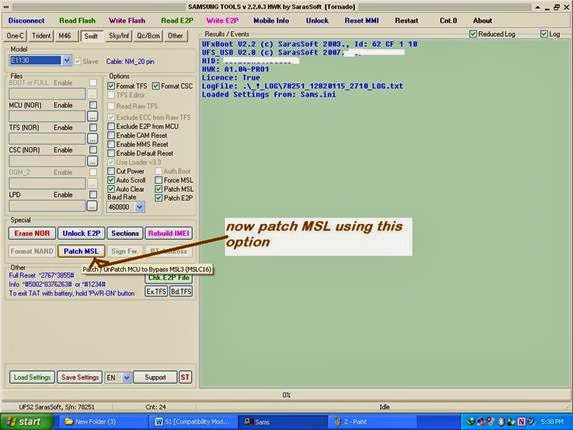
7. Now press patch msl button then it will patch mobile current firmware and it will unlock mobile


8. After all done press reset mmi, this will reset all mobile setting to its default.

Conclusion:
We have to use latest box available in market for successful unlocking and other repair operation of any mobile.

Saturday, March 12, 2011

Samsung no service display problem solution

Fault description:

Samsung some time shows no service on screen then when we try to connect any call then mobile displays no service and there no network indication appearance on display .

Fault solution:

Samsung mobile Mostly shows no service due to software error so for quick solving this problem Apply following tricks:

1. First reset mobile using this code *2467*2878# or we can do it via setting and then reset all then mobile will ask for password and  enter 00000 that is default code for Samsung , now check network
2. Now connect hwk to computer and attach mobile to hwk via desired flashing cable
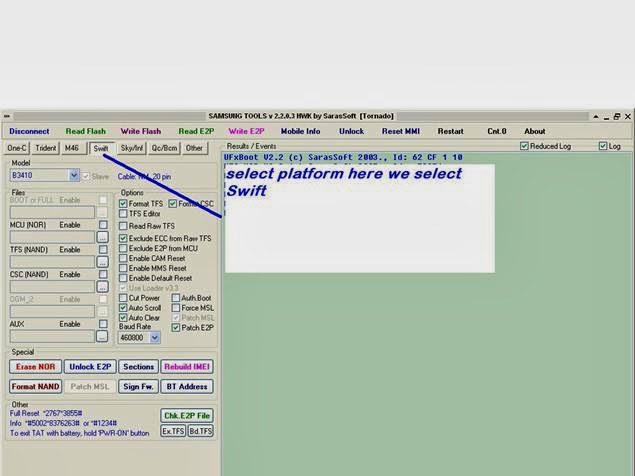
3. Select appropriate Samsung platform here we select swift from list


4. Now select model from model list here we select B3410 from model list


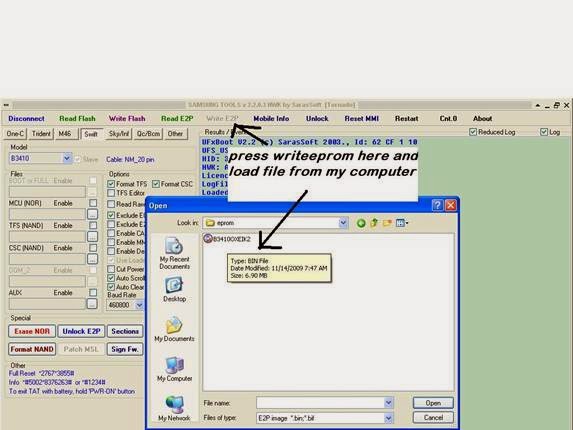
5. Now press write eprom button then it will ask for eprom file now locate eprom file and write it to mobile

6. After EPROM writing press reset mmi this option will full reset mobile after all process
Now check mobile it will show full network

Conclusion:
Before EPROM writing always backup first mobile EPROM because in case of any mismatching we can write back default backup.

 
Design by Free WordPress Themes | Bloggerized by Lasantha - Premium Blogger Themes | Laundry Detergent Coupons