Showing posts with label IPhone. Show all posts

Sunday, September 4, 2011

IPhone 3g home button not working

Fault description:

IPhone mobile have just one button on front side that is home button. Sometime home button doesn’t work in this case we can’t start menu or any program in iPhone. Even we can’t unlock iPhone because home button is main key for all programs.

Fault solution:

For solving this problem we have to carefully follow all these below described steps:
1.       For quick solution of this problem we have to first clean flex connector from any dust or carbon
2.       Than try to replace keypad filter as shown in yellow mark in image  and  check button 
3.       After all if still no solutions then finally connect three points together using applying jumper from flex connector point 1 to keypad filter and then from filter keypad point on pcb as shown in image below.


Conclusion:
During this point connection we should connect all points properly using special iron because bad soldering process my result in bad result.

Friday, September 2, 2011

IPhone mobile refuses sim card

Fault description:

In IPhone sometime mobile refuse to accept sim card it shows no service message instead of network indication. In some case we get network error that automatically no service message appears and we can’t connect call this is due to sim card IC problem

Fault solution:

For this problem solution we have to first check that weather flight mode is set to off mode then try following methods:
1.       First try to change sim card then check problem
2.       Secondly change the sim card jack and check for solution
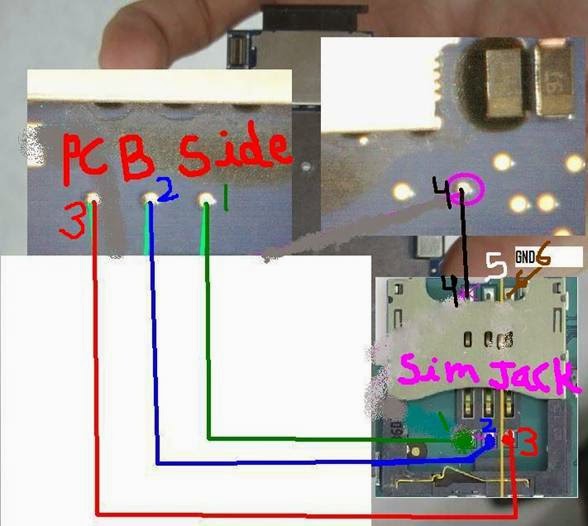
3.       If no success then check track line continuity from one to one sim connector to exact sim card internally circuit point on pcb carefully . 
4.       Those sim card  connector track are  shown in image with different color and numbering  below :


5.       If we found any track missing here then apply jumper as shown in image carefully.
After all done mobile will accept sim card properly.


Conclusion:
During track line checking on points on pcb we should have full knowledge of internal sim circuit point because wrong jumper can destroy sim circuit completely.

Monday, August 15, 2011

IPhone 3g ringer not responding

Fault description:
In IPhone sometime ringer (buzzer) starts not responding so we can’t hear music and ringtone sound this problem mainly occurs due to damaged ringer but some time due to internally line missing on ringer track from ringer IC

Fault solution:
For this problem solution we have to first check that weather sound profile is set to normal mode then try following methods:
1.       First try to do factory setting and check sound
2.       Secondly change the ringer and check sound
3.       If no sound then check that weather incoming voltage is appearing on ringer connecting point if voltage missing there then apply following tricks
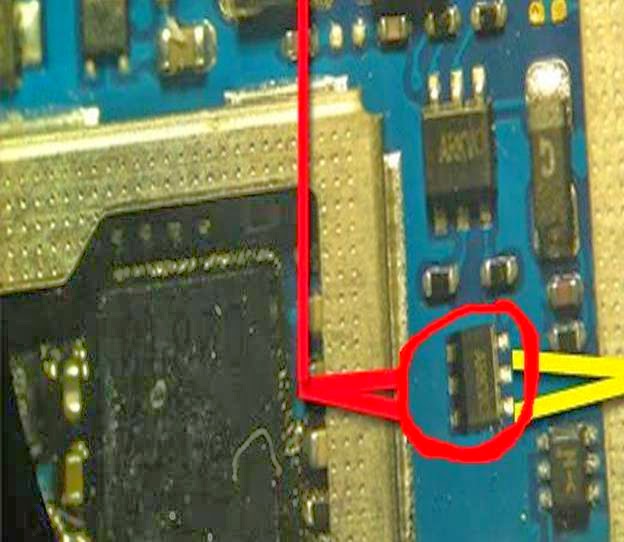
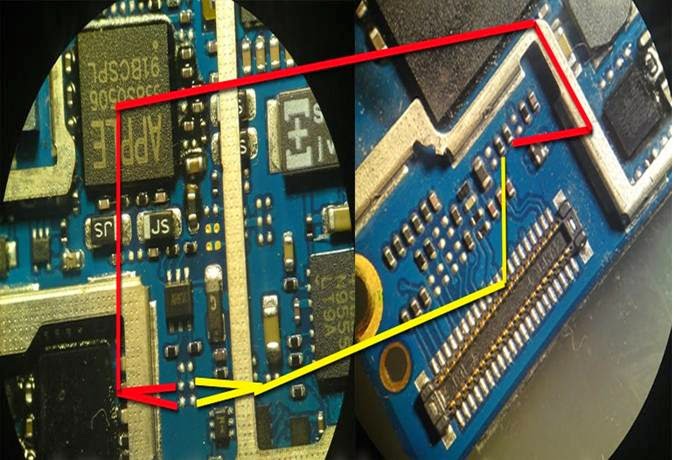
4.       First remove six leg ringer IC as shown in red mark in image below


5.       After removing IC apply following jumper from IC point to two resistances as shown in image below with red and yellow lines.


After all done we will hear sound from ringer properly.

Conclusion:
During IC removing process special care should be taken because rest of ICs and other component are very closer to it.

Sunday, August 14, 2011

IPhone 3gs batter drained shows full

Fault description:
Apple iPhone 3gs sometime got battery problem it drains battery quickly within some hours while battery shows full indication in such case we have to use charger many times.

Fault solution:
For solving this problem we have to consider these steps carefully because iPhones hardware section is very difficult to handle. So follow these strep carefully:
1.       First try to change data cable and charger then check battery backup
2.       Then try to reset mobile using setting then check problem
3.       If still no luck then use next hardware tricks

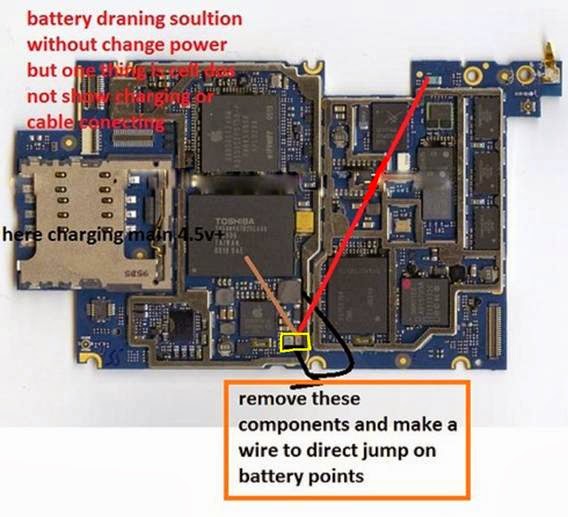
4.       In mobile we have two charging capacitors those work is to control charging function some time they had internal shorting so due to that we get false charging so remove two charging capacitor as shown in yellow mark in image


5.       Then apply jumper from that point to direct battery point then problem will solve.
6.       After all done we will get proper charging and battery backup but there is one disadvantage of this jumper that we cannot see charging process during process.  

Conclusion:
After applying this solution take care about charging time that we should not exceed more than 2 hour because over charging can damage battery.

 
Design by Free WordPress Themes | Bloggerized by Lasantha - Premium Blogger Themes | Laundry Detergent Coupons