Sunday, July 3, 2011

Sony ericcson x2 xperia not charging

Fault description:
Sony Xperia x2 mobile sometime got charging trouble. In such case mobile shows charging error or not charging or charging no response error. This problem caused by overcharging or over voltage from charger. 
  
Fault solution:
For this problem solution we should first check basic things like charger or new battery before checking hardware area. After these primary testing apply following tricks:-
1.    First clean battery connector due to some carbon on connector we get such error.
2.    Check charging point for any dust or carbon and fully clean it with acetone or white petrol. If problem still not solve then open mobile pcb and check next solution. 
3.    First check all charging point continuity from charging point to all point specified in picture in red mark. If line missing from any point then apply jumper from that charging pin point to that appropriate point. 
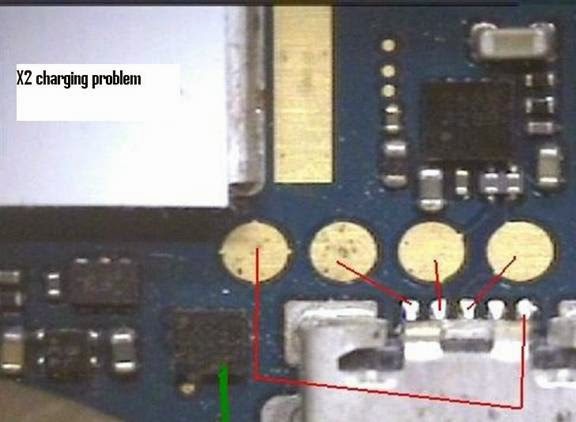
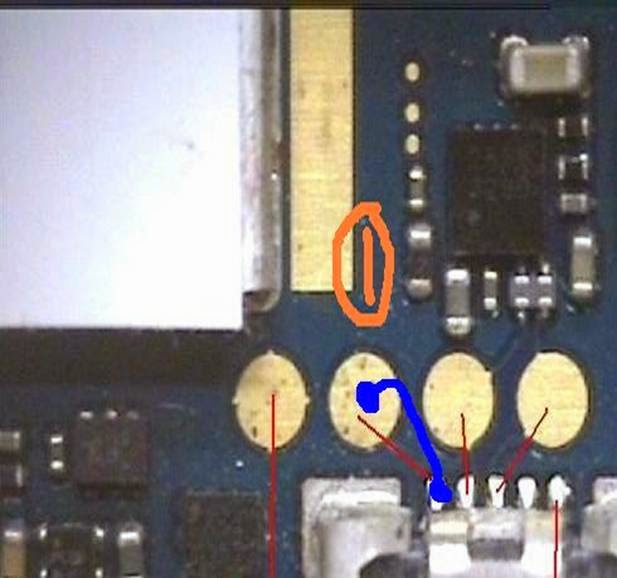
For example in this case charging connector point 1 have no line continuity to that point so we apply jumper in blue mark shown in image below.
4.    If problem not solve then try to rehot both charging IC and change both IC specified in picture below in green mark.
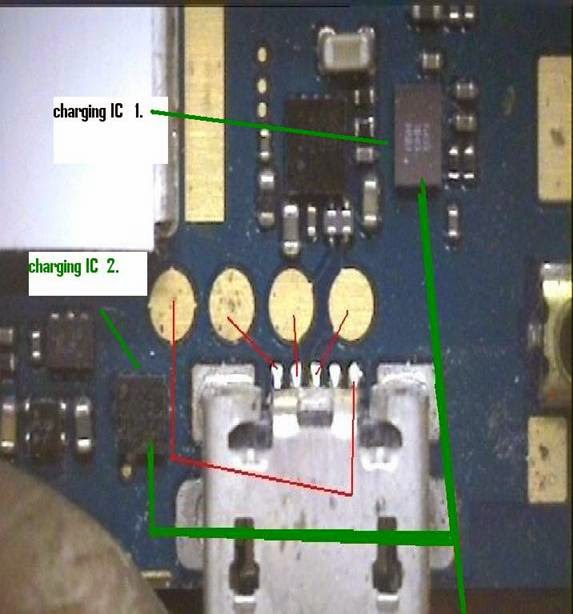
After applying all above tricks we will solve our charging problem . Conclusion :
While checking all line continuity we should use a perfect meter and equipment that will do a good job of testing and result in better checking and problem solving.

The problem is solvable, but it first important to clean the battery connector because when you are dealing with such a situation, any debris that may have lodged in the way is going to cause a problem. If you're lucky, once you clean the charging point that alone may solve your problem, although it is likely that further measures will be necessary.

It cannot be stressed enough how delicate such a battery really is in the sense that a tiny particle can simple prevent it from charging and cause it to shut down completely. It might sound like just another bothersome job to you to have to clean the battery connector, but no matter what the problem really is, and no matter what else you do, if you neglect to do this one small detail, it can prevent your mobile from working.

Wednesday, June 29, 2011

Samsung B3410 hang when sim card inserted

Fault description:
Samsung B3410 mobile sometime get strange problem that mobile hangs when we insert sim in mobile. But when we use mobile without sim card it works fine without any problem.

Fault solution:

For solving this problem we have to use software methods. Apply these easy steps to repair this problem.

1.       First reset mobile using code “*2767*2878#” after this mobile will shows e2p custom reset message on screen so wait 2 minutes then mobile will reset to its default factory mode now check problem.
2.        If no solution then connect Z3x box and attach mobile via flashing cable to box
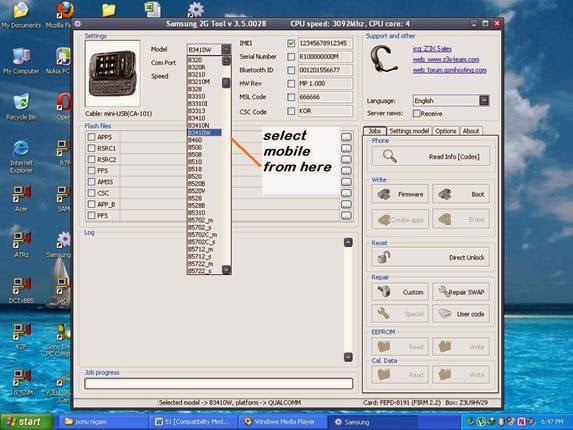
3.       Select model from model list here we select B3410 as shown in image:


4.       Now press read info button It will shows all basic information like software version ,imei no. , lock version etc.


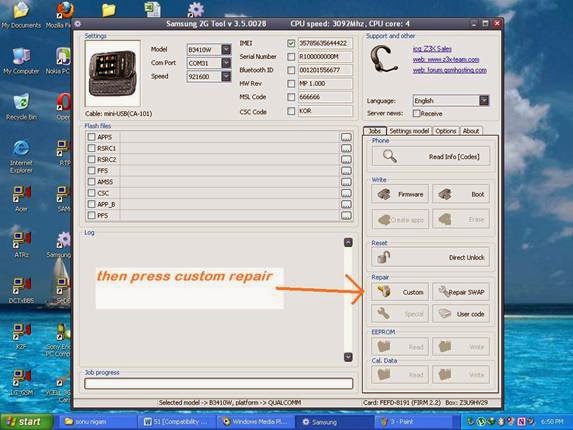
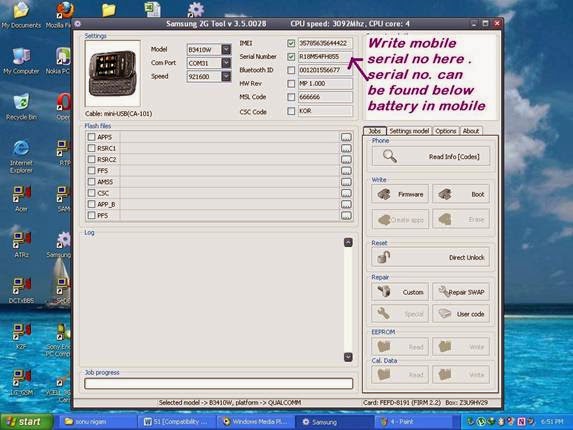
5.       Then if mobile will shows imei 0000000000000 (in 90% cases of hang with sim card) now write mobile’s original imei in imei tab as shown in image:


6.       After writing imei press repair custom icon it will write imei to mobile


7.       Now check problem if problem still not solved then we have to repair serial no also so use step 8
8.       Write mobile’s original serial no. in serial no. tab we can find serial no on back side rapper on mobile below battery. We should write proper serial no. because if we use wrong no. then mobile will permanently damage.


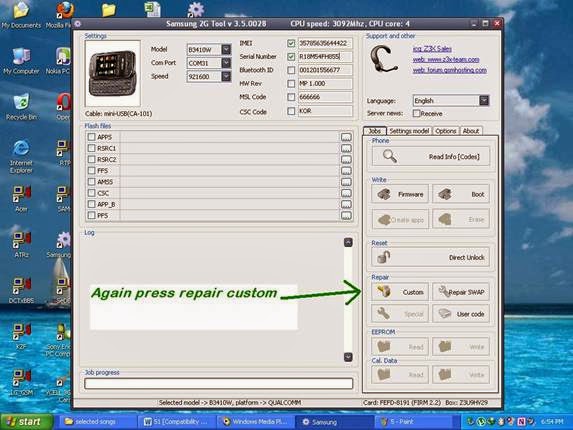
9.       After writing serial no. again press repair custom button then box will write serial no. to mobile.


10.   After all done check mobile info there we will find original imei no. and problem will solved.

Conclusion:
IMEI changing is illegal in some countries so write only original IMEI no. of same mobile written on mobile back side rapper or written on original bill.


Thursday, June 16, 2011

Samsung E1130 country lock with country provider problem

Fault description:
Some Samsung mobile have country lock with country provider so we can’t use any other provider sim into that this is called country lock. To use mobile in other country we have to unlock it first this is called unlocking process

Fault solution:
For unlock we have to use hwk or z3x or nspro box. Here we use hwk as example. Follow all these steps carefully:
1. First connect box to computer with mobile phone
2. Select mobile platform 
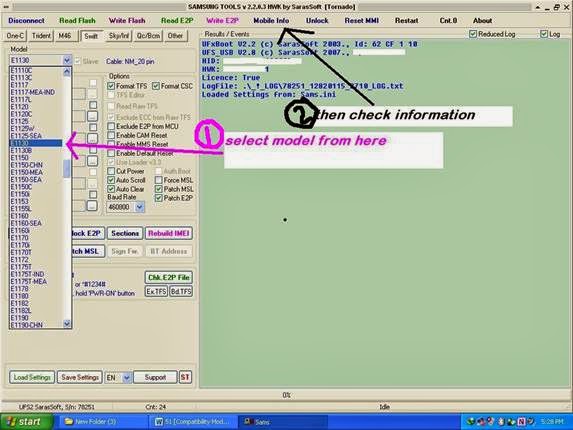
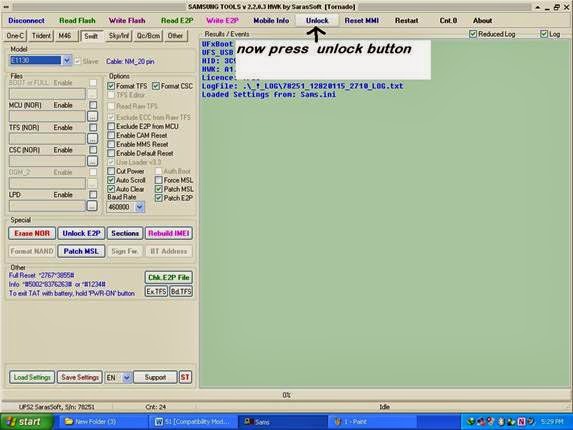
3. Select desired model and then press info here we select Samsung E1130


4. Then mobile will show all basic info about all lock provider and software version

5. Now press unlock button then box will start unlock process


6. After this check info again and check weather lock version is showing 0000000 if yes then it mean we have unlocked mobile otherwise go to step 7

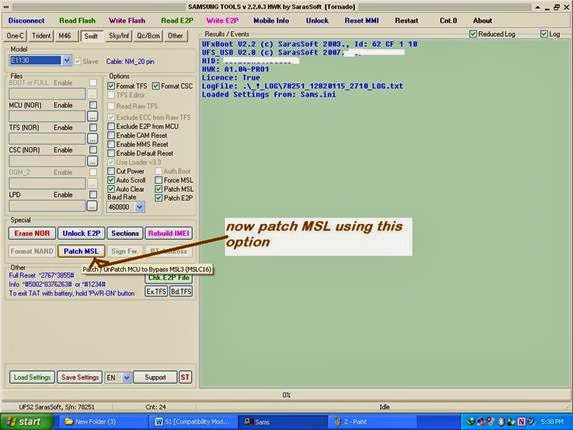
7. Now press patch msl button then it will patch mobile current firmware and it will unlock mobile


8. After all done press reset mmi, this will reset all mobile setting to its default.

Conclusion:
We have to use latest box available in market for successful unlocking and other repair operation of any mobile.

Tuesday, March 22, 2011

Sony ericsson w810i blinking red light gdfs file error solution

Fault description:

Sometime sony ericsson mobile just blink red light on upper side or sideways red light when we power on mobile and insert charger into mobile . This fault occurs due to gdfs file error. In sony ericsson mobile sometime due to wrong software update or memory card problem gdfs file corrupts and mobile just shows red light blinking. 

Fault solution:

This red light blinking problem is very complicated in these mobile we have to use setool or cruesior box for this problem quick solution
Here we take setool as example here.
Here are some simple steps for repairing red light blinking problem: 

A. First fully charge mobile battery and check problem
B. Secondly connect setool to computer and open setook software
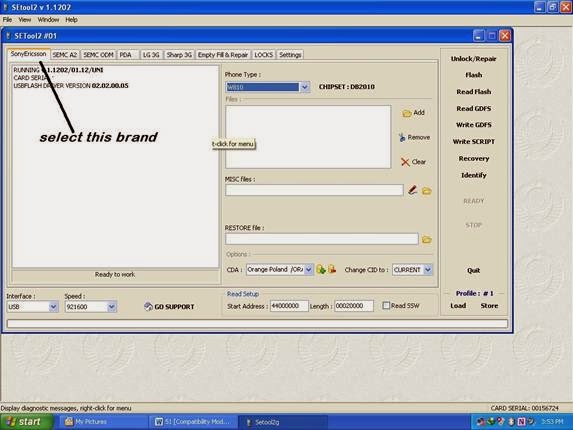
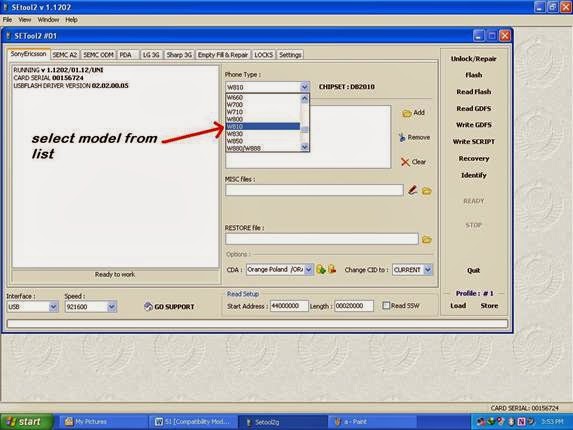
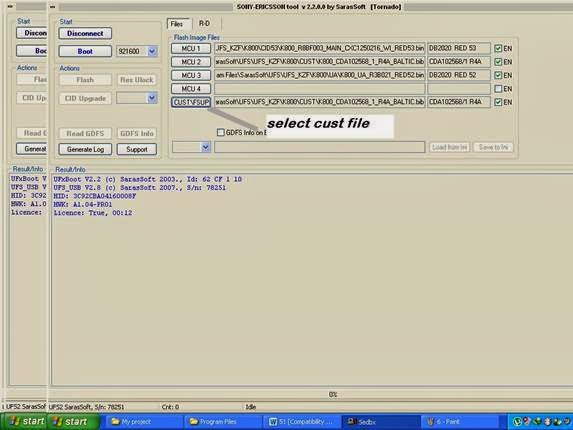
C. Now select brand from brand list and select model here we select w810i


D. This is a db2020 chipset mobile
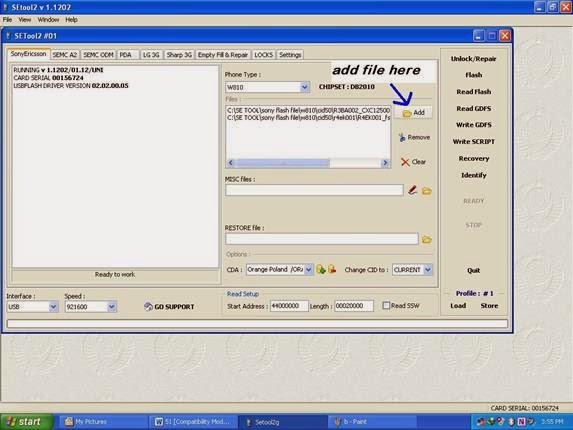
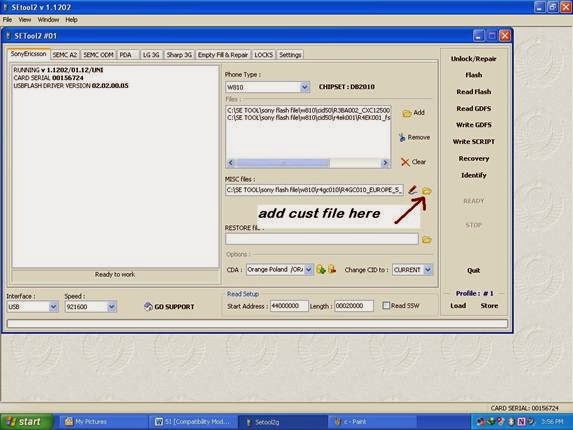
E. Now select bin file and fs file


F. At last select cust file according to your country


G. Now go to setting tab 

H. Tick mark customized phone after flash


I.        Now select flash button then it will ask for mobile connection then connect mobile then box will full flash mobile and after all done it will shows all information correctly. Then check mobile now it should power on properly.


Conclusion:
Red light blinking problem is major problem so use always appropriate cust file according to your country region otherwise problem will remain same.

Saturday, March 12, 2011

Samsung no service display problem solution

Fault description:

Samsung some time shows no service on screen then when we try to connect any call then mobile displays no service and there no network indication appearance on display .

Fault solution:

Samsung mobile Mostly shows no service due to software error so for quick solving this problem Apply following tricks:

1. First reset mobile using this code *2467*2878# or we can do it via setting and then reset all then mobile will ask for password and  enter 00000 that is default code for Samsung , now check network
2. Now connect hwk to computer and attach mobile to hwk via desired flashing cable
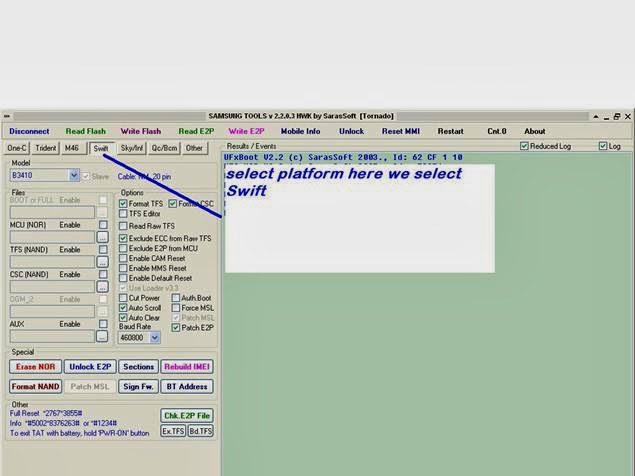
3. Select appropriate Samsung platform here we select swift from list


4. Now select model from model list here we select B3410 from model list


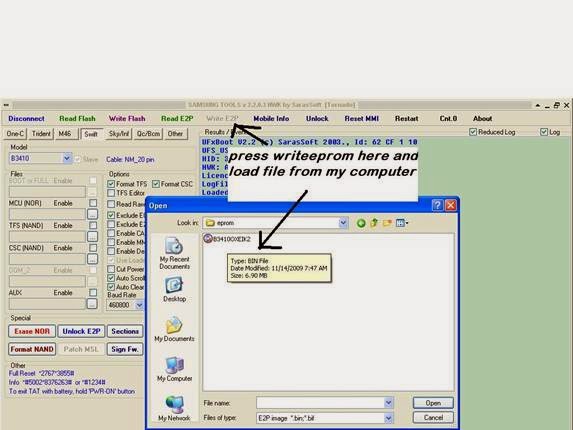
5. Now press write eprom button then it will ask for eprom file now locate eprom file and write it to mobile

6. After EPROM writing press reset mmi this option will full reset mobile after all process
Now check mobile it will show full network

Conclusion:
Before EPROM writing always backup first mobile EPROM because in case of any mismatching we can write back default backup.

Saturday, February 26, 2011

Sony ericsson k800 logo hangs then power off solution

Fault description
Sony ericsson k800 mobile has hanging problem mostly. This problem appears due to Internet virus or installing unauthorized game or apps. In such case mobile just shows sony ericsson logo on main screen and then power off after few second. And even we cannot charge mobile due to corrupted software.

Fault solution
For solve this problem we have to use flasher box that support sony ericsson flashing like setool box,universal box,hwk etc . Here we use hwk box for flash sony ericsson mobile.
1. Connect box to pc
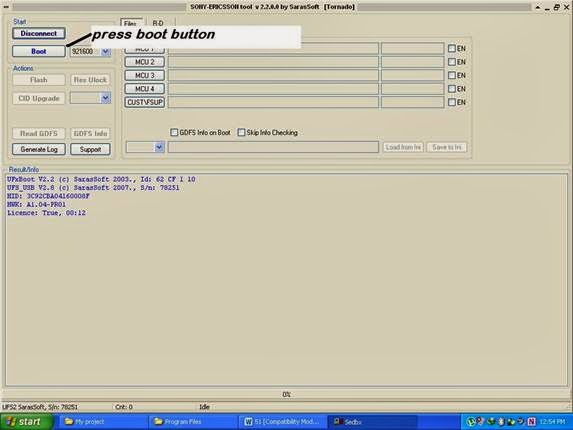
2. Open sony ericsson tool named SEdbx
3. Press boot button

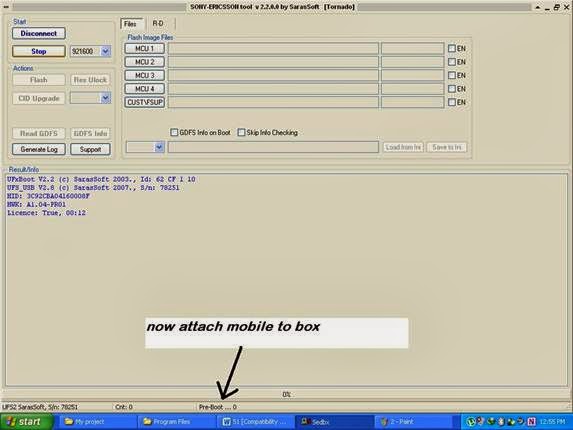
4. Now insert flash cable into mobile charging connector then box will detect mobile and will show all basic info about mobile like software version, phone cid,gdfs version etc.


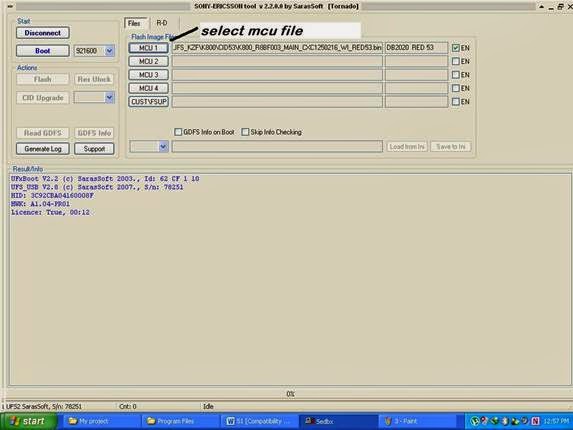
5. Now select flash file one by one. During selecting flash file we should take care about phone's cid and all file should be of same cid as mobile.
6. First select mcu bin file

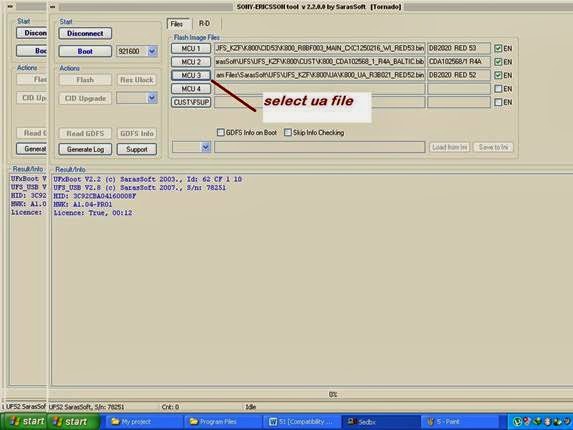
7. Then select fs file

8. Now select ua file

9. At last select cust file

10. Now press write flash button then box will start to upgrade mobile software and approx after 10 minuet all process will done and mobile will be in power on mode.      


Conclusion:
During flash file selection we should care about cid version. If we select wrong cid flash file then we will damage our mobile completely.
      

Wednesday, February 23, 2011

Fix no network problem in nokia 5800 using flasher box


Introduction:

In some cases when network just appear for 5 second and then no network ,in such type of situation we have to use flasher box for repair that problem . There are many flasher box available in market for nokia mobile like hwk,mx-key,universalbox,mt box etc..


Description: 

Network fault in nokia mobile sometime can be caused by software error.
There are two main reasons that cause network problem that are shown below:
A.      Setting mismatch
B.      PM (permanent memory) file error

A. Setting mismatch :
There are some networks setting in mobile due to these mismatching we get network error. 

Solution:
We can access these setting in setting – network setting - Network type –
If you are using 3g sim then select dual mode or 3g mode else select gsm mode

B. PM file error :
Pm (permanent memory) file is permanent file that is stored in mobile it contains mobile product data like product code, life timer and purchasing date, repairing date etc. if this file got any error then mobile have network problem that it just appears for few second then no network.

Solution:
Connect mobile to any nokia flasher box via fbus cable.  Here we use hwk box as example
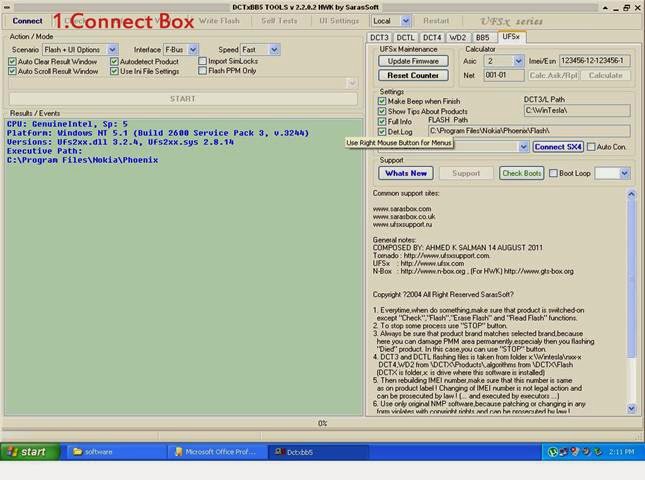
1.      Connect box - first connect box to pc
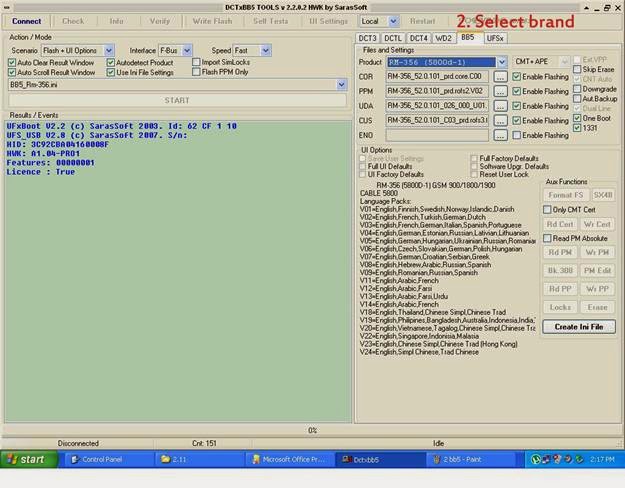
2.      Select brand -  Then select appropriate mobile brand like DCT3,DCT4,WD2,BB5
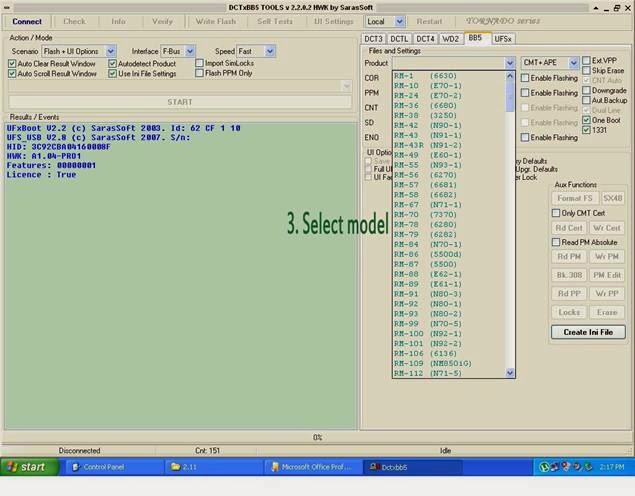
3.      Then select correct model from list here we take nokia 5800 as example.
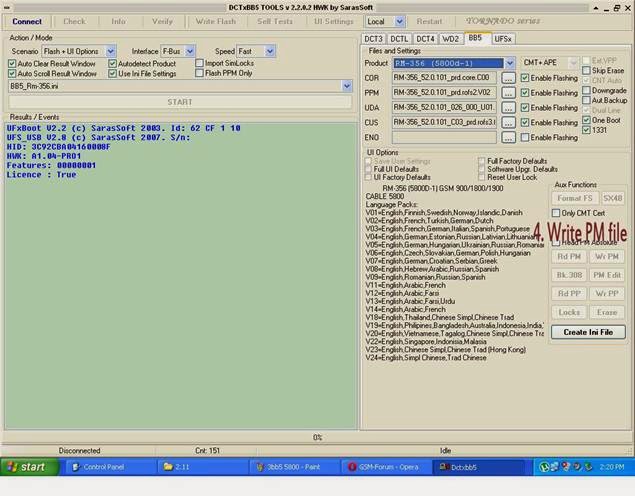
4.      Then write Appropriate PM file of that mobile.

Screenshots:

1.    Connect box: first connect box to computer and attach mobile.

2.    Select brand: we have to select brand here we select BB5 from brand tab. 

3.    Select model: select model from model list as shown below

4.    Write PM file: after selecting model press write pm file it will write pm file to mobile.  


Conclusion  :
In network fault repairing(using software method) we have to consider only one file PM file carefully because if we write wrong file then we can damage our mobile permanently so be careful when writing PM file .    


Design by Free WordPress Themes | Bloggerized by Lasantha - Premium Blogger Themes | Laundry Detergent Coupons